Overlay · structure
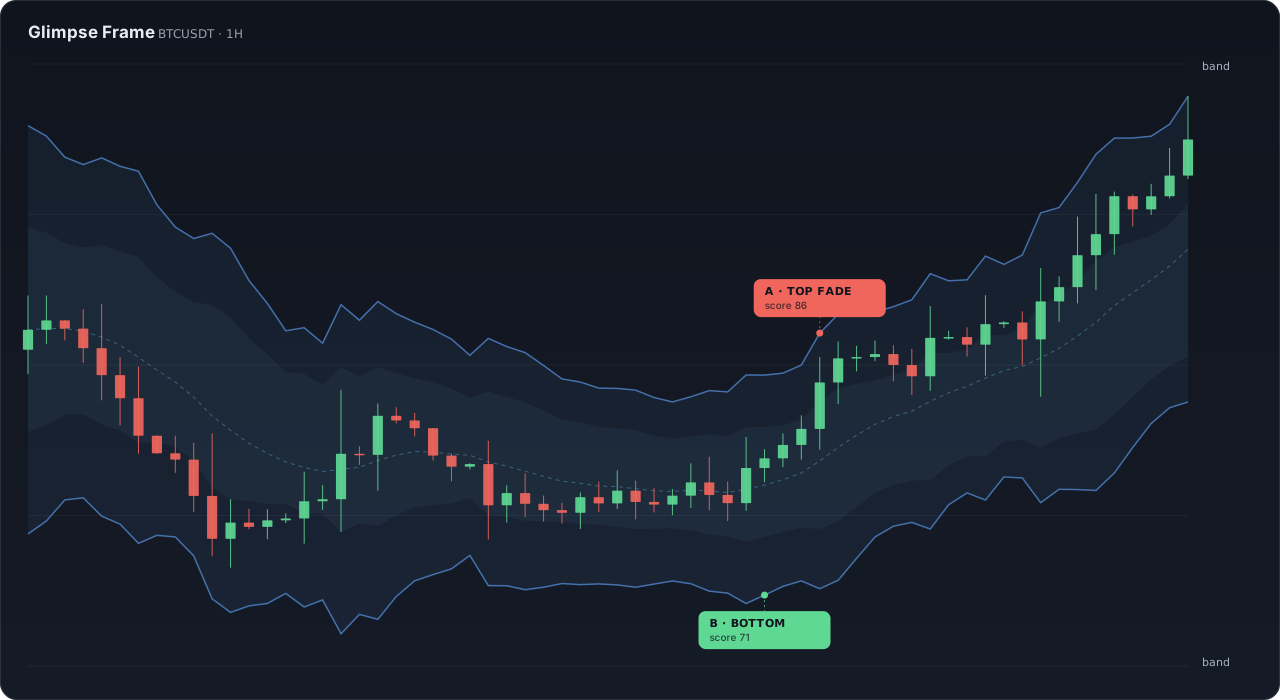
Glimpse Frame
An adaptive ATR channel that shows where price sits in its range — and grades every reversal it finds.
Graded reversalsDivergencesICT killzonesVector volume
Indicator concept · educational preview
Two indicator studies from the Glimpse desk. Frame shows where price is stretched; Pulse times when momentum turns. The same reads run live on the free Market OS.
Public methodology preview · no exchange connection required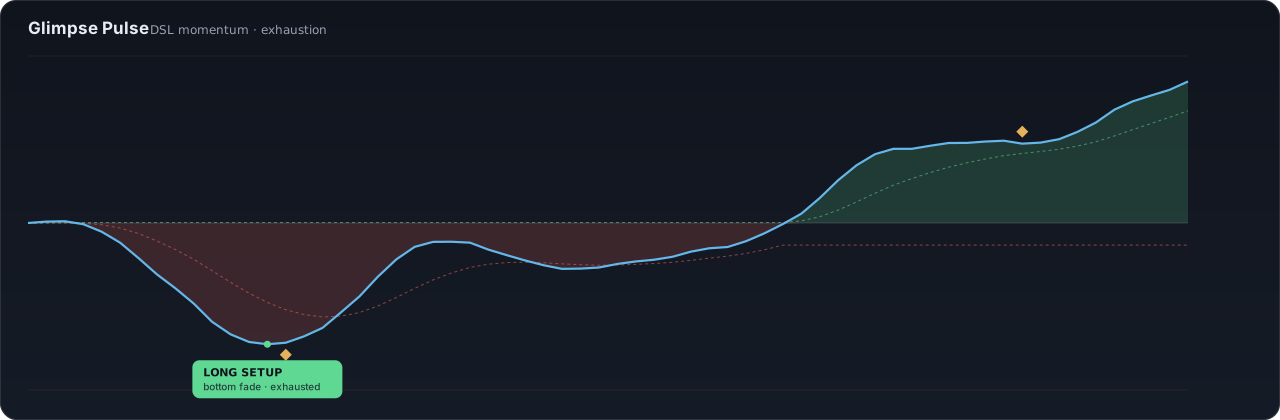
An adaptive ATR channel that shows where price sits in its range — and grades every reversal it finds.
Indicator concept · educational preview
A multi-period momentum engine that flags exhaustion, fades, re-entries and continuation legs — gated by a higher-timeframe regime filter.
Indicator concept · educational preview
Every reversal scored 0–100, graded A / B / C.
See when a push runs out of fuel.
Catch the next leg, not the noise.
Price vs momentum, auto-matched.
Lean with the higher timeframe; stand down in chop.
1-minute to daily, auto-tuned.
Glimpse Signals say what they see in plain words on the chart. Here is the full vocabulary.
Long candidate — price stretched low while momentum exhausts.
Short candidate — price stretched high while momentum exhausts.
The prior trend resumes after a failed bounce or dip.
The next leg in the same direction as the trend.
Confluence quality, 0–100. A is the highest-conviction setup.
Price and momentum disagree — a turn may be brewing.
Location asks where. Momentum asks when. Confluence decides.
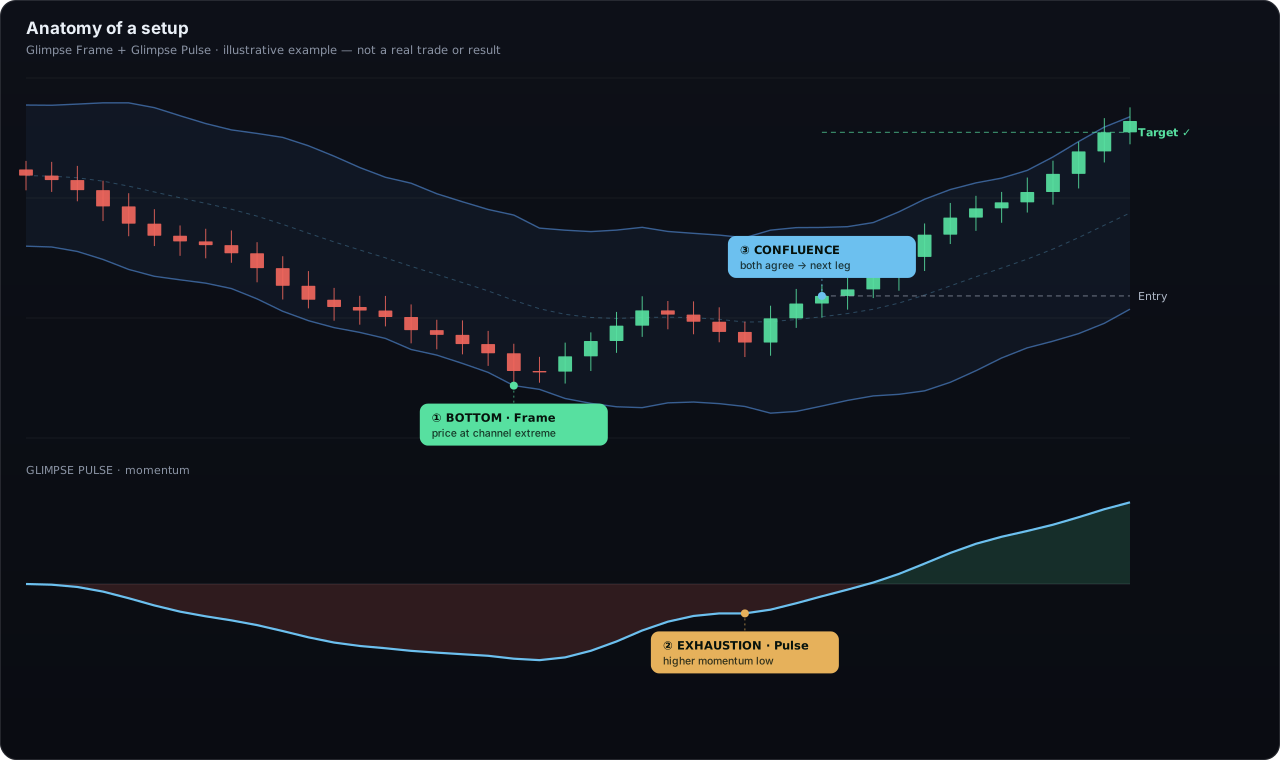
Glimpse Frame flags when price is stretched to its channel edge — the zone where moves tend to resolve.
Glimpse Pulse shows whether momentum is still expanding or exhausting, and prints a fade when a push runs out of fuel.
Favour setups where the grade is high (A/B), the regime agrees, and Frame and Pulse point the same way.
Set entry, stop and target before you act. The tools describe the setup — the risk decision is always yours.
Quick exhaustion fades and re-entries on the lowest timeframes.
Killzone-aware turns where London and New York do their damage.
Channel extremes and divergences for higher-timeframe positioning.
Glimpse Signals put the desk's reads on your charts. The free, public Market OS shows the same picture in real time — no account required.
The channel extremes and key levels Frame draws are the same liquidity and structure the Market OS maps.
The exhaustion and regime shifts Pulse times feed the same reads the desk publishes in plain language.
We don't post cherry-picked screenshots. The Glimpse desk reads structure and momentum with the same logic behind Frame and Pulse — and publishes its full closed-trade ledger, wins and losses alike. Go read it, then judge for yourself.
Illustrative examples on this page are for education only. Past performance is not a guarantee of future results, and these tools are not a promise of profit.
Private TradingView-script access is not part of the current plan catalog. Market OS is the live product surface for these structure and momentum concepts.
Public, read-only Market OS. No card required.
A saved, synced Market OS workspace with alerts, history, no ads, and actionable altcoin setups.
Software access does not require an exchange connection. Optional execution remains independently subject to country, exchange, account, API, approval, funding, and safety gates.
Two TradingView indicators from the Glimpse desk — Glimpse Frame (structure) and Glimpse Pulse (momentum). They are analysis tools that describe what price and momentum are doing; they are not buy or sell signals and do not predict price.
Open the public Market OS to inspect live structure and momentum evidence without an account or exchange connection.
No. Private TradingView-script access is not included in the current Free, Market OS Plus, Pro, or VIP catalog.
No exchange connection is required for Market OS software. Optional execution is a separate product state with country, exchange, account, API, approval, funding, and safety gates.
Confirmed signals print on closed bars. Some early-warning and watch states update during the live bar by design and settle on close — each label says which it is.
No. Glimpse Signals are educational analysis tools, not financial advice and not a recommendation to trade. Trading is risky and you can lose money. Read the risk disclosure before trading.
The educational examples on this page show how the methodology is read from 1-minute through daily charts. They do not grant or promise access to a private script.
The public Market OS shows analogous structure and momentum evidence live, while the public ledger lets you audit closed model outcomes. Neither surface requires an exchange connection.
Inspect the public structure and momentum read for free — a free account keeps your desk. Choose Market OS Plus when you want alerts, history, no ads, and full setups.
Glimpse Frame and Glimpse Pulse are analysis tools, not signals to buy or sell. They describe structure and momentum — they do not predict price or guarantee an outcome. Read the risk disclosure first.